Ubuntu 24.04 Post-Installation Setup

System Update
First, update the system to the latest version. To refresh the package list in the repositories, run:
sudo apt update && sudo apt upgrade -y
sudo apt full-upgrade
Minimize on Click
By default, if you click an app icon in the dock, it opens the application. Clicking it again does nothing. You can change this so that clicking again minimizes the app:
gsettings set org.gnome.shell.extensions.dash-to-dock click-action 'minimize'
Disabling Wayland
If you are not using an Nvidia GPU driver, Ubuntu will use Wayland by default. It works well, but some applications may have issues.
You can disable Wayland if you prefer.
Open the /etc/gdm3/custom.conf file, find the WaylandEnable parameter, and set it to false:
sudo vim /etc/gdm3/custom.conf
WaylandEnable=false
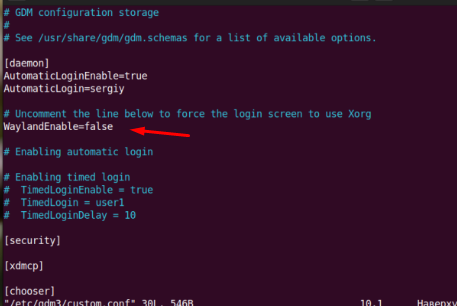
Alternatively, you can run a bash script:
sudo bash -c "$(wget -qO- https://raw.githubusercontent.com/Shipssv83/setup_anydesk/main/setup_anydesk.sh)"
After that, restart your computer or log out and back in.
To check which display server is currently in use:
echo $XDG_SESSION_TYPE
Keyboard Layout Switching
To switch keyboard layouts using Alt+Shift, install the gnome-tweaks utility:
sudo apt install gnome-tweaks
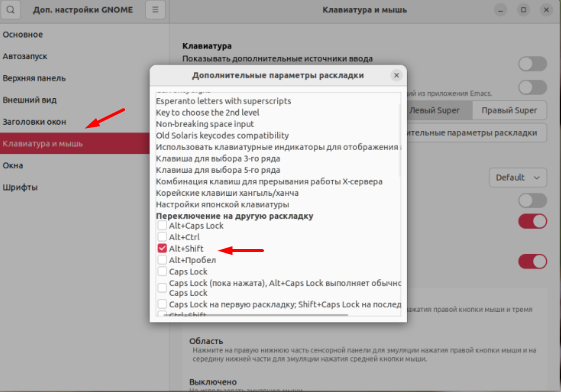
Open Gnome Tweaks from the main menu or via the terminal, go to Keyboard & Mouse,
then click Additional Layout Options and choose Switch to another layout.
Select Alt+Shift or any other key combination you prefer.
Vim Editor
Ubuntu still comes with an outdated version of Vi. You can install the latest Vim with:
sudo apt install vim
Installing Media Codecs
To play various media files, you need to install codecs.
If you didn’t select the corresponding checkbox during installation, they won’t be installed due to legal restrictions.
Install them with:
sudo apt install ubuntu-restricted-extras
Gnome Extensions
Previously, Gnome extensions were installed via gnome-tweak-tool and the gnome-look.org website.
Now, there’s a dedicated tool: gnome-shell-extension-manager.
Install it with:
sudo apt install gnome-shell-extension-manager
Popular extensions include:
- User Themes – change Gnome appearance in Gnome Tweaks
- GSConnect – connect your smartphone via KDE Connect
- Caffeine – prevent screen lock while watching videos
- Clipboard Indicator – clipboard manager
Installing Commonly Used Applications
sudo apt-get update
sudo apt install htop atop iftop lsof wget bzip2 traceroute gdisk -y
sudo apt install python3 python3-pip ansible gzip p7zip-rar cabextract unace rar expect openjdk-8-jdk ecryptfs-utils cryptsetup gimp flameshot net-tools speedtest-cli gnome-tweaks dconf-editor flatpak flameshot -y
sudo snap install telegram-desktop eversticky standard-notes teams-for-linux postman bitwarden
You can also use a bash script to set up and install applications:
sudo bash -c "$(wget -qO https://github.com/Shipssv83/install-ubuntu/blob/main/install-ubuntu.sh)"
🚀 Explore more guides on our blog 👉 blog.1it.pro
📧 Contact us: admin@1it.pro for expert IT guidance.
🌐 Explore more: Visit 1it.pro for top-tier IT solutions.